


Route4Trucks - Truck GPS App
3.612.00 Reviews
App Specs
- Version
- 1.3.13
- Updated On
- License
- Free
- Downloads
- 10,000+
- Developer
- Route4Me, Inc
- Categories
- Maps & Navigation
- Platform
- Android
Screenshots
 Analysis by AppCompare
When I judge a navigation app for truck drivers, I start with a practical question: does it help me make decisions that a standard car map may not be built around? Route4Trucks is aimed at commercial-vehicle navigation, so its appeal is less about finding the quickest-looking line on a map and more about whether its truck-focused approach suits the work I actually do. It’s a free app from Route4Me, Inc, rated for Everyone, and the current version is 1.3.13. That makes it easy to consider, but the value depends on the routes and tools available to you rather than on the download alone.
What you get before paying
The key cost detail is straightforward: the app is free to install, while in-app purchases are listed at $9.99 per item. I wouldn’t treat that as proof that every useful feature is free, or assume that one purchase covers every need. Before building a work routine around it, I’d check the purchase options shown in the app and confirm exactly what each one unlocks. A price on its own doesn’t tell me whether a tool is a good fit for my operation.
That distinction matters for drivers deciding between a specialist navigation app and a familiar general-purpose map. A free starting point lowers the barrier to trying it, but any paid option should earn its place by helping with a specific task you handle regularly. If you only drive a truck occasionally, paying for something you rarely use may not make sense. If you navigate commercial routes every day, even a modest purchase could be worthwhile if it solves a real problem for you.
Where truck-focused navigation can help
A useful test is to think through a delivery from dispatch to arrival. A car-focused map can be convenient for a quick address search, but commercial driving brings different decisions: a route that looks short may not suit the vehicle, and a detour can matter when you have a tight schedule. A dedicated truck-navigation option is worth evaluating when those constraints are central to the job, not just an occasional inconvenience.
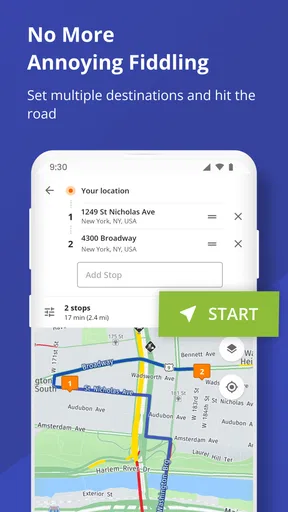
For example, imagine leaving a depot with several stops and a delivery window that leaves little room for backtracking. I’d use a truck-oriented app as a planning aid before departure, then keep my attention on the road rather than repeatedly changing destinations while driving. That small workflow change is useful regardless of which navigation app you ultimately prefer: settle the plan while parked, check that the route makes sense for the vehicle, and avoid treating the screen as a substitute for road signs or sound judgement.
What I’d check before relying on it
Truck drivers should be cautious about treating any navigation screen as final authority. Vehicle dimensions, weight limits, temporary restrictions, and local conditions can all affect whether a road is suitable. I’d verify the route against signs and the information available for the specific road, especially near a delivery site, in unfamiliar areas, or when a route seems unusually convenient. This is not a knock unique to Route4Trucks; it’s a sensible habit with any GPS.
I’d also test the app on a familiar trip before depending on it for a time-critical run. That gives you a chance to learn how its route guidance is presented and spot any mismatch between the suggested path and what you know about your vehicle or regular roads. A short trial on a known route is more informative than discovering how an unfamiliar interface behaves when you’re already under pressure.
Worth Reading Before You Choose

Flipboard Shows What News Apps Must Do Beyond the Feed

Switching to Android Auto Means Rethinking Your Driving Routine

Google Calendar Makes a Crowded Week Easier to Manage

Ludo King Makes the Most of the Minutes Between Plans

Baby Panda World Brings Quick Play to Modern Phones, but Its Game Library Feels Busy

ESPN’s Live Game View Makes Following Close Games Easier
Who is likely to get the most from it?
Route4Trucks is most relevant to commercial drivers who want to assess a navigation app specifically for truck use. It may also interest an owner-operator comparing tools before committing to a paid option. The app has 10K+ installs and a 3.8 average from 38 ratings, which gives a prospective user some context, but I wouldn’t read those figures as a guarantee that it will match every truck, region, or work routine. The practical test is whether its guidance fits your vehicle and the routes you drive.
If you mainly need directions for a car, walk, or occasional personal trip, a standard map app may be the simpler choice. It may already cover your everyday needs, and a truck-specific tool could add little if commercial restrictions rarely affect your journeys. Likewise, drivers who need a particular fleet workflow should check whether the app fits that process before paying; navigation and fleet management are not automatically the same thing.
How it fits beside familiar map apps
The choice is not always between one app and another. Many drivers already have a general map they know well, and familiarity can be valuable when you need a quick address lookup or want to check an alternate route while parked. A truck-oriented app is worth considering for the parts of a journey where vehicle suitability matters more than the shortest route shown for an ordinary car. I’d compare the route choices on a trip I know, rather than assume that a specialist label alone guarantees a better result.
There’s also a practical trade-off in carrying more than one navigation option. A second app can give you another perspective, but switching between screens or following conflicting instructions can create confusion. If you use Route4Trucks alongside another map, decide in advance which one is your primary guide for that trip and use the other only for a specific check while safely stopped. That keeps comparison useful instead of turning the cab into a contest between prompts.
A sensible way to evaluate the cost
Because the app is free to download and offers in-app purchases at $9.99 per item, I’d separate the trial decision from the purchase decision. First see whether it suits your routine without assuming that every option is included. Then consider paying only if an available item addresses a recurring need and its terms are clear to you. That approach is safer than buying on the strength of a feature promise before you know how the app behaves on your routes.
It’s also worth asking what “value” means for your driving. A tool that saves a little planning effort may be useful to one driver, while another may care more about avoiding unsuitable roads or keeping a familiar workflow. I wouldn’t put a dollar value on hypothetical time saved; I’d judge the purchase against a concrete task you repeat and whether the app helps you handle it more confidently.
First Impressions Matter
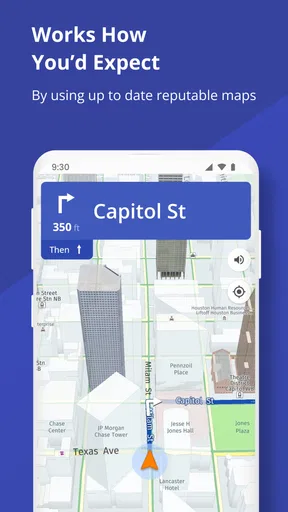
From the moment I downloaded Route4Trucks, I could tell that the developers had truckers in mind. The interface is clean and straightforward, which is a breath of fresh air when you’re juggling a phone and a steering wheel. It’s easy on the eyes and doesn’t bombard you with unnecessary features. It’s like the app is saying, "Hey, I’m here to help, not to distract."
Features That Stand Out
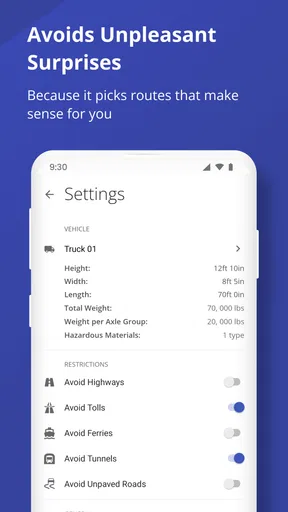
One of the features that immediately caught my attention was the app’s ability to customize routes based on your truck's specifications. Whether you’re hauling a double trailer or navigating a flatbed, the app calculates routes that accommodate your vehicle’s size and weight. No more getting stuck in tight spots or low bridges – this feature alone is worth its weight in gold.
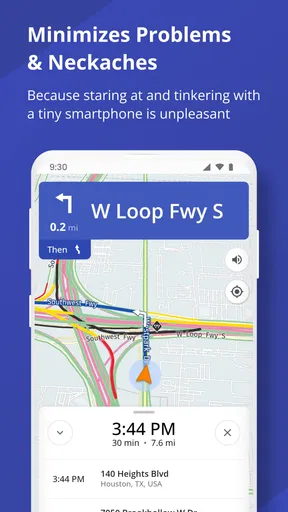
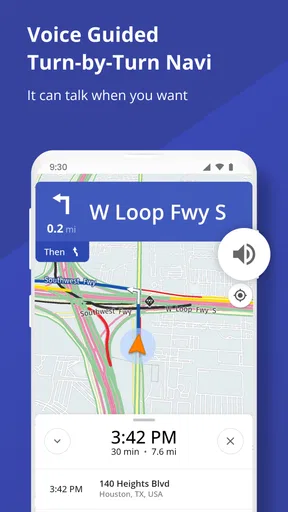
Another nifty feature is the real-time traffic updates. Ever been stuck in a jam and wished you had a heads-up? Well, Route4Trucks has got your back. The app provides live traffic updates and suggests alternative routes to keep you moving efficiently. It’s like having a personal traffic controller in your pocket.
Fuel Stops and Rest Areas
As a trucker, knowing where to fuel up and catch some Z’s is crucial. Route4Trucks integrates a comprehensive list of truck stops, rest areas, and fueling stations along your route. The app even offers user reviews, so you know which spots are worth your time. I found this particularly helpful on long hauls when I needed to plan my breaks strategically.
Safety First
Safety is paramount on the road, and Route4Trucks doesn’t skimp on this front. The app alerts you to road hazards, weight restrictions, and other potential dangers along your route. It’s like having an extra pair of eyes watching out for you, which can make all the difference when you’re navigating unfamiliar territory.
Ease of Use
One of the things I appreciate most about Route4Trucks is its user-friendly nature. Even if you’re not tech-savvy, the app is intuitive enough for anyone to use. Setting up your profile and entering your truck’s details takes just a few minutes, and the GPS kicks in without a hitch. It’s efficient, reliable, and doesn’t require a steep learning curve.
What’s the Catch?
No app is perfect, and while Route4Trucks comes pretty close, there are a couple of things to keep in mind. The app does require a subscription, which might be a dealbreaker for some. However, considering the value it brings to the table, I’d say it’s a worthwhile investment.
Also, like any GPS app, it’s only as good as its data, so occasional inaccuracies can pop up. But honestly, the pros far outweigh the cons, and these minor hiccups haven’t deterred me from relying on it daily.
Wrapping It Up
All in all, Route4Trucks is a must-have for anyone in the trucking industry. It’s designed with the trucker in mind, providing essential features that make life on the road easier and safer. Whether you’re a seasoned driver or just starting out, this app is bound to become your new best friend.
So, if you’re tired of the usual GPS apps that ignore the needs of truckers, give Route4Trucks a spin. It’s not just another app; it’s a tool that transforms the way you navigate the highways and byways. Happy trucking!
Pros
- Highly accurate truck-specific routes.
- Real-time traffic updates improve efficiency.
- Customizable settings for different truck types.
- User-friendly interface with clear navigation.
- Offline maps available for remote areas.
Cons
- Limited compatibility with older devices.
- Some features require a premium subscription.
- Occasional bugs in rural area mapping.
- Heavy battery usage during extended trips.
- Limited language support outside English.
FAQs for Route4Trucks - Truck GPS App
What makes Route4Trucks different from other GPS apps?
Route4Trucks is specifically designed for truck drivers, taking into account the unique needs and restrictions of commercial vehicles. It includes features like truck-specific routing, avoiding low bridges, and providing information on weigh stations. Additionally, it offers trip planning tools that consider load type and truck dimensions, making it a reliable choice for professional drivers.
Does Route4Trucks require an internet connection to function?
Route4Trucks primarily uses offline maps, which means you don’t need a constant internet connection for navigation. However, some features, like real-time traffic updates and weather conditions, require an internet connection. This ensures you have access to the most accurate and up-to-date information, even in remote areas.
How accurate is the truck-specific routing in Route4Trucks?
Route4Trucks utilizes a comprehensive database of truck restrictions, including bridge heights, weight limits, and road conditions, to provide accurate routing for truck drivers. Regular updates ensure that the information remains current, minimizing the risk of encountering unexpected obstacles on your route.
Can Route4Trucks help with compliance and documentation?
Yes, Route4Trucks offers features to assist with compliance, including electronic logging and documentation tools. It helps track hours of service, fuel usage, and mileage, making it easier for drivers to maintain compliance with regulations. This can be especially beneficial during inspections or audits.
Is Route4Trucks suitable for all types of trucks?
Route4Trucks is versatile and can be customized for different types of trucks, including those with varying dimensions, weights, and load types. When setting up the app, you can input your vehicle’s specifics to ensure that the routing and recommendations are tailored to your truck’s needs, enhancing safety and efficiency.


